Real Time Reputation Scores On Twitter

When Twitter launched their list feature recently, I immediately wondered if #FollowFriday was going to go the way of the dinosaur. For those out there not using Twitter, you have the power to "follow" people of interest and see what they are saying.  By following people of similar personal or professional interests, you get an idea of what is happening in real time.

As you begin to follow people, you are exposed to more and more who can really offer interesting things to say.

Because I wanted to read about what's new in Tech, I followed Leo Laporte, founder of the TWiT® Netcast Network. Because I wanted to read about entrepreneurs and start-ups, I followed Jason Calacanis, founder of Mahalo.com.  Because I wanted to read about Project Management, I followed Dave Garrett, CEO of Gantthead.com.  Granted, I didn't just go out and follow them at random.  I followed others and patiently waited for Friday to arrive to see who they would recommend to Follow.  Though I enjoy this organic process of discovery, it is not particularly efficient.  Though the introduction of lists has allowed me to see similar people in large numbers, there is no guarantee it is nothing more then a popularity contest.

Who shall I follow and who shall I recommend to follow?  Alas, I am but one person.  Who am I to suggest who you should follow and who you should not? I will yield my recommendation to one I consider superior in the decision making process.  I yield to what James Surowiecki termed the Wisdom of the Crowd and a nice webapp created by The Plan Is.

It appears The Plan Is tracks all tweets tagged with #pmot and uses them to update a list of the most influential project managers on Twitter. Updates are calculated continuously and new results are displayed every 5 minutes. They won't tell you how the scores are calculated, as that would make it too easy to game the system.  It appears ranking is based on the number of followers, volume of tweets being retweeted, and the number of lists appeared on.  I may be wrong.  But, the list appears pretty accurate.  Go on Twitter and look at the hashtag #pmot.  If you say (tweet) something interesting, it gets retweeted.  If people like to read what you're tweeting, you'll get followed.  What I like about this dynamic reputation score is there are NOT people out there tweeting "vote for me, vote for me".  It just seems to work.

So, you're a new Project Manager, Scrum Master, Agile aficionado, or Kanban practitioner on Twitter.  Who do you follow?  Who has the best reputation, from the crowd point of view?  Follow the links below and find out.

Project Managers on Twitter

  1. DaveG253: 2175 points
  2. francisojsaez: 1800 points
  3. projectmgmt: 1685 points
  4. ProjectShrink: 1400 points
  5. Qtask: 1400 points
  6. JohnEstrella: 1135 points
  7. pmstudent: 1100 points
  8. franciscojsaez: 980 points
  9. thesambarnes: 915 points
  10. PM_StrayDogg: 835 points

If you would like to see a list from an Agile perspective, there's a list for that as well.

Note:  The 10 Project Managers in the list above were dynamically generating at the time of this post.

Free Project Team Organization Worksheet

Project Team Organization

Project Team Organization

Today I'm going to write about (and provide) a free Project Team Organization worksheet to complement the Project Charter Template so many have downloaded. Both files are free for download, modification, and distribution. [Team Organization Worksheet] [Project Charter Template] When using the Project Team Organization worksheet, note that there are 4 sections:  Structure, Roles and Responsibilities, and a Responsibility Matrix, Project Facilities and Resources.  I'm going to focus on the first three.

Step 1: Describe the organizational structure of the project team and stakeholders, preferably providing a graphical depiction (organization chart).

Step 2: Summarize roles and responsibilities for the project team and stakeholders identified in the project structure above.

Step 3: Complete the responsibility matrix for each of the project roles. As a graphical depiction of a more detailed perspective of responsibilities, the matrix should reflect by functional role the assigned responsibility for key milestones and activities.

Step 4: Describe the project's requirements for facilities and resources, such as office space, special facilities, computer equipment, office equipment, and support tools. Identify responsibilities for provisioning the specific items needed to support the project development environment.  Hey, you're people need places to sit and equipment to get their work done.

With preliminary approval, copy these values into Section 3 of our free Project Charter Template. Upon Project Charter approval, apply the identified team members to activities in Microsoft Project or your selected Project Management application.

Another thing I would recommend is leverage the data from this worksheet in your Communications Management Plan.  You've already identified people and their roles or responsibilities.  The most important thing to remember is do what makes sense.  This planning worksheet isn't required to do a Charter.  It's supposed to make things easier for you and lower the risk of not knowing who is on your team and what they are responsible for.

[Team Organization Worksheet] [Project Charter Template]

Free Work Breakdown Structure Worksheet

WBS Worksheet

WBS Worksheet

As I look at the logs of the Critical Path website, I notice a trend for what people are searching.  Most visitors coming to this site are searching for project management related templates and worksheets.  If there is one thing I try to instill in other project managers, it is listen to your customers!  That being said, here is a Work Breakdown Structure (WBS) worksheet to complement the Project Charter Template so many have downloaded.  Both files are free for download, modification, and distribution. [WBS Worksheet] [Project Charter Template] When using the WBS worksheet, list the project’s major milestones and deliverables, the corresponding unique identifying numbers, and the target dates for delivery. This list should reflect products and/or services delivered to the end user as well as the delivery of key project management or other project-related work products.

With preliminary approval, copy these values into Section 3.2 of our free Project Charter Template.  Upon Project Charter approval, copy the values from the major milestones column into Microsoft Project or your selected Project Management application and begin creating the activity list (decomposing).

Starting Is Easy; Finishing Is Hard

I once saw (via video podcast) a wise man (Jason Calacanis) say "starting is easy; finishing is hard." When he said that, it was a moment of absolute clarity for me.  I'm not saying he verbalized the meaning of life.  He did state, however, what I've often conceptualized but was never able to verbalize.

What Jason stated in 6 words is what I've seen many colleagues struggle with.  Who doesn't have projects and tasks to complete and deadlines to meet?   I've tried multitasking, thinking it would make me more efficient.  I've tried using a productivity pyramid.   All I did was start more tasks, not finish more.  That's the key right there.  It doesn't matter how many things you start if you never finish them.

The solution to my past problems has been the use of kanbans, referring to them as information radiators.  These information radiators were large billboards strategically placed around the office so anyone could passively see the status of the current project.  You could see what the highest priority was, what was currently being completed, and what was being delayed.

I believe the key to those successes was in the ability to visualize our work.  Everyone knew exactly what they needed to complete and everyone else knew if it was getting done.  People were not allowed to go on to ancillary activities until their assigned tasks were completed.  Another important facet of the kanban, we limited our work-in-progress.  This forced-focus on limited tasks and constant feedback loop is very powerful and very productive.

If you would like to read my complete guest post at the Personal Kanban website, on how I visualize my work and FINISH it (don't forget the comments), just follow the [link].

How We Can Make Agile Work

bustedI just read a really good post at PM Hut titled Agile Myths DebunkedSanjeev Singh listed 12 reasons people say Agile won't work on their projects and how they are misinformed.  His list included:Indiscipline, lack of planning, no documentation, no QA involvement, not for fixed bid projects... and the list goes on.

From my experience, organizations commonly get caught up in their project management processes.  I think they fail to realize, when saying they can not use Agile, the goal is to deliver value to the customer. As professionals, we should focus more on how it can work and less on why it can not.  I do believe Sanjeev's listed myths are the primary reasons Agile isn’t more broadly adopted in some markets.  I’ve sat in meetings and heard those same myths listed as though being read directly from his blog post. Only by educating clients and debunking these myths will we see more adoption.  I'm not saying Agile will work in every circumstance for every project.  What I am saying is you should never discount something unless you've at least tried.  Do your research and see where you can make it work.

Impress Your PMP Friends By Understanding SPI and CPI

Variance Charts

Variance Charts

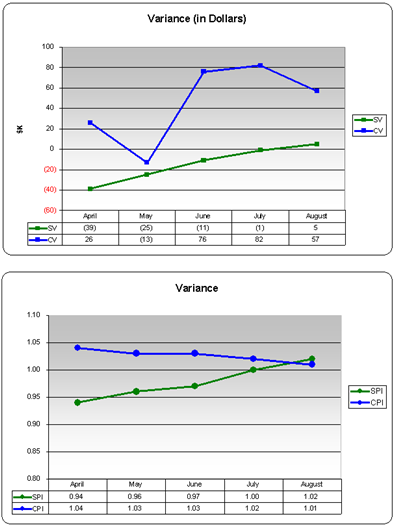
Are you studying for the PMP exam and struggling with the concept of Schedule Performance Index (SPI) and Cost Performance Index (CPI)? Are you just bored and want to impress your friends with your knowledge of SPI and CPI?  Well, I'm going to try to make it easy for you. To the left you'll see two charts.  Both are displaying variances on a monthly basis.  The first chart is displaying variances in thousands of dollars, both in schedule and cost.  The second chart is displaying the variances as they relate to a performance index.

Definitions and Formulas

  • Earned Value (EV) - The estimated value of the work actually accomplished

  • Actual Cost (AC) - The actual cost incurred from the work accomplished

  • Planned Value (PV) - The estimated value of the work planned to be done [Chart 1 - Variance (In Dollars)]

  • Scheduled Variance (SV)=EV - PV a NEGATIVE schedule variance is behind schedule and a POSITIVE schedule variance is ahead of schedule

  • Cost Variance (CV)=EV - AC a NEGATIVE cost variance is over budget and a POSITIVE cost variance is under budget[Chart 2 - Variance]

  • Schedule Performance Index (SPI)=EV ÷ PV You are progressing at __% of the rate originally planned

  • Cost Performance Index (CPI)=EV ÷ AC You are getting $_____ worth of work out of every $1 spent

Practical Application

So, where does that leave us?  Your goal is to have a $0 (zero dollar) cost and schedule variance, resulting in a SPI and CPI of 1.0.  That would mean you estimated correctly, leading into your project.  Going into the PMP exam, you should know these formulas and how to calculate all of the above.  Here are a 2 simple questions you should be able to answer:

1.  Is a 1.3 CPI a good thing or a bad thing?  Why?

This is a good thing!  A 1.3 CPI translates to you getting 1.3 dollars of results for every dollar you put into the project.

2.  Is a 0.90 SPI a good thing or a bad thing?  Why?

This is a bad thing!  A 0.90 SPI translates to your project progressing at 90 percent of the rate originally planned.

Here is the moment of truth. What kind of question is going to be on the PMP exam?

Example Question: Based on the charts listed above, what would you be more concerned with, schedule or cost, if you were taking over this project from another project manager?

Answer: The answer is cost.  As of August, CPI is closest to 1.

Kanban for Lean Project Management

Zen Logo

For those out there using Kanban for Lean Project Management, let me sing the praises of Zen.  Zen is a tool that applies the ideas of the Toyota Production System (commonly known as "lean" principles) to project management. Whether you already practice lean in your organization, you want to set up a lean process, or you just want an easy and effective way to manage your process, Zen will work for you.

Since I started using Zen back in July, my productivity increases has been astounding.  I used to think multi-tasking was the best way to deliver value.  I couldn't have been more wrong.  Instead, I now limit my Work In Progress to only 3 and only focus on 1 at a time.

Though I wrote about this product back in August, I wanted to give a formal product endorsement.  Getting started is free of charge. Once you begin using it on your projects, the cost is reasonable and scalable.  The Zen creators focused on what really matters, and designed an open-ended and easy to customize product.  They don't overwhelm you with metrics and force you to try to figure out what matters.  Instead, they track just a few high-value indicators such as cycle time and lead time.

My Personal Kanban

If you've already implemented lean ideas in your organization, Zen can easily be used to replace a manual kanban board and spreadsheets, and has all the features you would expect to find in a lean project management tool.  If you think I'm a fanboy, you'd be right!  I love this product.  Check out www.agilezen.com